OKX verification code not arriving? Fix it channel by channel
Email and SMS codes fail for different reasons. Treat them as two separate problems instead of retrying the same button five times.
An OKX code passes through three places before it reaches you
Verification codes travel through more infrastructure than people assume. An email code passes through OKX's sending servers, your provider's spam filters, and whatever rules your inbox applies before it reaches you. An SMS code passes through an SMS gateway, your carrier's network, and — for prepaid or virtual numbers — sometimes filtering rules on top of that. A delay or drop can happen at any of those points, and it's rarely OKX's system itself that's broken. Working through the checklist below by channel is faster than guessing.
Email code not showing up
Check spam and promotions first
Check this first. OKX's registration emails sometimes land in spam or, on Gmail, the Promotions tab rather than the primary inbox. Search your inbox for "OKX" directly rather than only scrolling — some mail clients sort automated mail into folders you don't check by habit.
Whitelist the sender
Add OKX's sending domain to your contacts or safe-senders list, then request a fresh code — a whitelisted sender won't fix a code that already expired, so this step only helps going forward, not retroactively.
Rule out your email provider blocking it
Corporate and school email accounts often filter automated mail more aggressively than personal ones, sometimes silently, with no bounce notice at all. If you're signing up with a work or edu address and nothing arrives even in spam, try a personal email instead — Gmail, Outlook, and similar personal providers tend to be more permissive with exchange-related mail.
Wait out the resend cooldown
OKX rate-limits resend requests to prevent abuse. Hammering the resend button repeatedly won't speed anything up and can trigger a longer cooldown before the next request is even accepted — space out retries by a minute or two rather than clicking continuously.
SMS code not showing up
Confirm the country code is correct
Check this first: a wrong or missing country code is easy to miss, since the field often looks filled in correctly at a glance. Double-check the number field shows your number exactly as your carrier would dial it internationally, digit by digit.
Check for carrier-side SMS filtering
Some carriers filter or delay messages from international short codes, especially on prepaid or MVNO (mobile virtual network operator) plans that resell capacity from a larger carrier. If verification codes for other services arrive fine on the same number but this one doesn't, that's a reasonably strong sign the filtering is carrier-side rather than an OKX problem.
Why virtual numbers often never get OKX codes
Numbers from VoIP apps or virtual SIM services frequently don't receive OKX's SMS codes at all, since many verification providers deliberately exclude these number ranges to cut down on abuse. If you signed up with one of these and codes never arrive, switching to a real mobile line is usually faster than any workaround.
Switch verification channel where possible
If SMS consistently fails on a given number, some screens let you fall back to a different method for the same step. If email already went through, that at least confirms one side of the account is working correctly, which narrows the problem down to the phone number or carrier specifically.
Try switching networks
Occasionally the issue is closer to your device than your account — restarting the phone, toggling airplane mode, or switching from Wi-Fi to mobile data (or back) can clear a stuck delivery. It costs nothing to try before assuming the problem is upstream.
What OKX's own SMS checklist adds
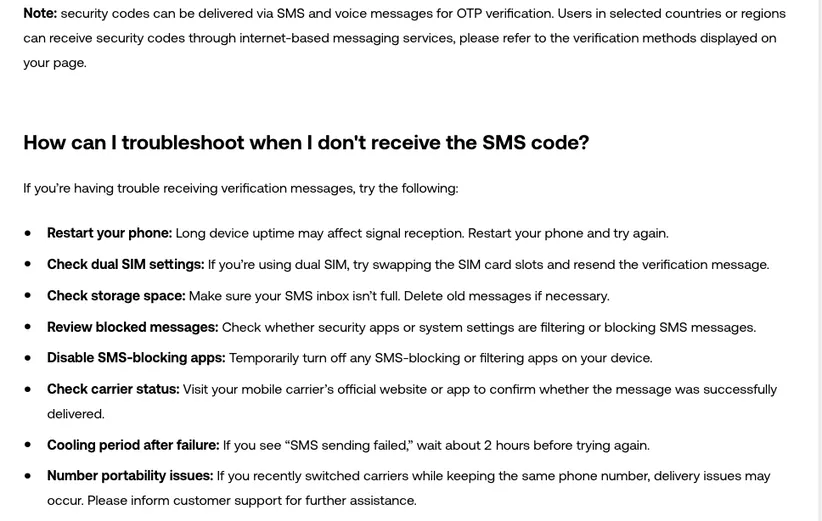
OKX's Help Center has its own list for missing SMS codes, and three items on it go beyond the steps above. If the screen shows "SMS sending failed," wait about two hours before requesting another code. On a dual-SIM phone, try moving the SIM to the other slot. If you recently moved your number to a new carrier, contact OKX customer support. The same list also asks you to check phone storage, blocked messages and any SMS-blocking apps.
Neither code arrives? The email or number may already be on another OKX account
If both channels fail after the checks above, the account itself may be the issue — for example, an email or phone number already tied to a different OKX account, since each can only register once. At that point, OKX's own support channel through the app or help center is the right next step, not a repeated resend.