Choose EUR or EURC when you trade OKX's euro pairs in the EEA
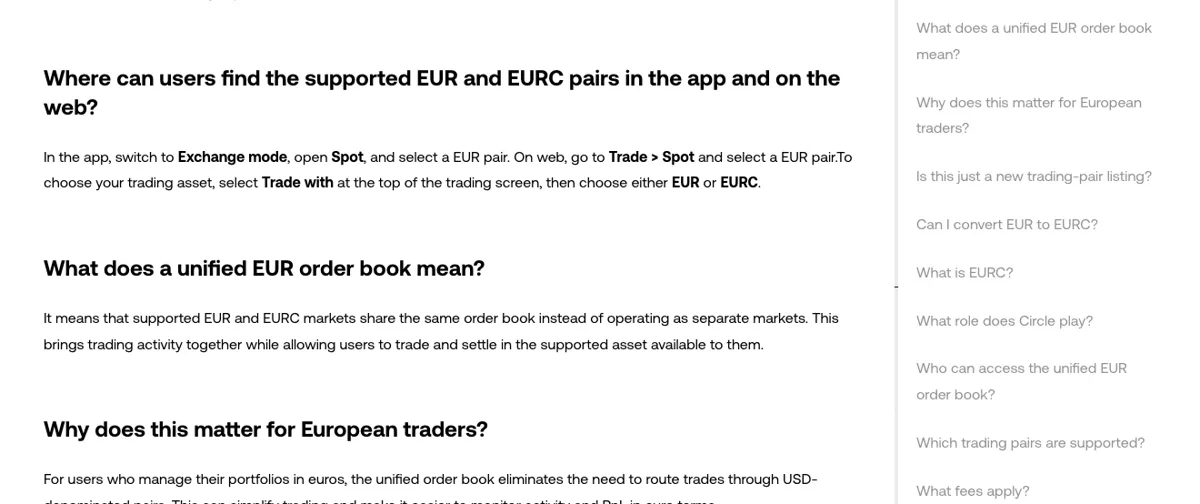
On OKX Europe, EUR and EURC pairs now trade on one shared order book. You open a EUR pair in Spot, then pick EUR or EURC under Trade with at the top of the trading screen. Eligible users in supported EEA countries can also convert euros to EURC at a 1:1 rate, though standard trading fees may apply and are shown before you confirm.
How OKX's shared EUR/EURC order book works
Supported EUR and EURC markets on OKX now share the same order book instead of running as separate markets. OKX describes it as more than a new trading-pair listing: a change to the market structure underneath, pulling EUR and EURC liquidity into one book while each user trades and settles in whichever of the two supported assets is available to them.
In practice that should mean a buy order placed with euros can meet a sell order from someone who chose EURC, and the other way round, because both sit in one queue.
The reason OKX gives for building it is aimed at people who keep their portfolio in euros. With a euro book for the pair, a trade no longer has to be routed through a USD-denominated pair, and OKX says this can make it easier to follow your activity and profit or loss in euro terms.
| Question | What OKX Europe's FAQ says |
|---|---|
| Who can use it | Eligible OKX users in all supported EEA jurisdictions |
| Which pairs | All available EUR and EURC pairs on app and web; search for EUR or EURC to see yours. Availability may vary by region and change over time |
| EUR to EURC | Eligible users can convert at a 1:1 rate |
| Fees | Standard trading fees may apply, based on your fee tier and the transaction; any fees are shown before you confirm |
Choosing EUR or EURC on a euro pair in the OKX app and on the web
The switch between the two assets sits on the trading screen itself, not in a separate menu.
Open a EUR pair in Spot
In the app, switch to Exchange mode, open Spot and select a EUR pair. On the website, go to Trade > Spot and select a EUR pair. Searching for EUR or EURC lists the markets your account can see.
Set Trade with to EUR or EURC
Select Trade with at the top of the trading screen and choose either EUR or EURC. That choice is the asset you trade and settle in; the order book behind the pair is the same either way.
Check the fees shown before you confirm
Any applicable fee or charge appears before you confirm the trade or conversion. If the order is a limit order, how maker and taker rates apply to it is covered in OKX trading fees: maker, taker and your account rate.
If a pair you expected is missing, or the euro pairs don't show at all, the FAQ's own caveat is the place to start: availability may vary by region and change over time, and access depends on being an eligible user in a supported EEA jurisdiction. When the whole product is blocked rather than one pair, “OKX Isn’t Available in Your Region”: What It Means goes through the account-side causes. To get euros into the account in the first place, see How to deposit euros on OKX by SEPA bank transfer.
Converting euros to EURC at 1:1, and what EURC actually is
OKX says eligible users can convert EUR to EURC at a 1:1 rate. The rate is fixed at one for one, but the FAQ doesn't call the conversion free: standard trading fees may apply depending on your fee tier and the transaction you complete. So the EURC you end up with can be less than the euros you put in by the amount of any fee, and the screen before confirmation is where that shows.
EURC is a euro-denominated stablecoin issued by Circle, backed by euro-denominated reserves and designed to be redeemable 1:1 for euros. Circle's own page adds the regulatory detail: EURC is issued by Circle Internet Financial Europe SAS, an electronic money institution authorised by the ACPR in France, and it qualifies as an e-money token under MiCA. USDT is handled very differently on OKX Europe, and How to Convert USDT to USDC on OKX Europe (One-Way Only) covers that route.
Being designed to redeem 1:1 doesn't remove market risk. OKX lists it plainly: crypto-assets including stablecoins carry risk, prices and liquidity can change, and stablecoins may not always maintain their intended value. Read the product information and risk disclosures on OKX before you trade.